
Local Installation
Config Frontend and Backend
In the script files, you will find three folders: frontend, backend and docs.
Backend
This is the file tree for the backend:
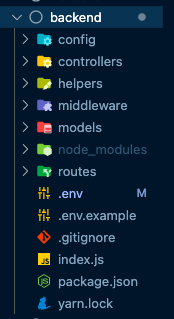
Edit .env file
-
You will have to edit the .env file or rename .env.example to .env
-
Inside the .env file you will have the following environment variables, which you must replace with your credentials.
// .env file

MONGO_URI=mongodb://localhost:27017/casino?retryWrites=true&w=majority
JWT_SECRET=secretWordJWT
FRONTEND_URL=http://localhost:3000
BACKEND_URL=http://localhost:4000
CALLBACK_SECRET=Jhjd83jKSNjdlem
EMAIL_HOST=sandbox.smtp.mailtrap.io
EMAIL_PORT=YOUR_SMTP_PORT
EMAIL_USER=YOUR_SMTP_USERNAME
EMAIL_PASSWORD=YOUR_SMTP_PASSWORD
Frontend
This is the file tree for the frontend:
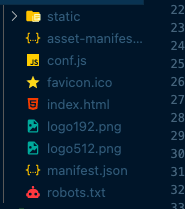
Edit the backend url
- Open the conf.js file
- Edit the BACKEND_URL var, to your backend url

Install app
- Open your command line / cmd / terminal
- In your command line move to your backend folder
- Run the next code to install dependecies
npm run install
Run app
Once you have configured all of the above, you are ready to run your application.
- In your command line on the same folder run:
npm run start
- Move to frontend folder and open the command line and run the next code
npm install --global serve
- When it finished, move back 1 folder level and run:
serve frontend
Go to configuration step…